Tuesday, May 10, 2016

Generic Programming

Tuesday, May 10th 2016

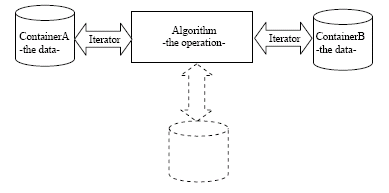
What is Generic Programming? Generic Programming is a style of writing code whereby code functions are written input type agnostic. That is, regardless of the type of input (array, obj, etc), the function is able to process that information all the same and return a predictable output. A perfect example of a function that was written with generic programming principles is the forEach function. forEach detect what the type of the input was (array/object based) and then iterates through the list accordingly.


Generic programming helps us abstract towards the purpose of the function. Rather than having to create several different functions (all with the same purpose but fit for different input types), we can abide by DRY by simply using one function.

References
http://www.generic-programming.org/
http://www.boost.org/community/generic_programming.html
http://stackoverflow.com/questions/3862378/what-is-the-meaning-of-generic-programming-in-c

Monday, May 9, 2016

Functional Polymorphism within Javascript

Monday, May 9th 2016

What is functional polymorphism within Javascript? Well, in Object-oriented programming, polymorphism describes how a language is able to process inputs differently depending on their data type (str, arrays, etc). It also outlines the ability to redefine preexisting methods for derived classes. Consider the image below:


The draw() method is attached to the class 'shape'. Polymorphism allows us to derive the draw() method from the shape class and apply it to subclasses (or different data types), in this case: triangles, rectangles and circles because they are all shapes.

In JavaScript, we can use functional polymorphism to delegate functions onto data of different types. For example, arguments is not a real array and, therefore, doesn't have access to the .sort() method on the Array class. However, we can manipulate the code to get the function of sort() onto arguments, despite it not being an Array by doing something similar to the following:


Polymorphism is an important and cool tool in JS that allows us to stay DRY (method delegation) and KISS (borrowing predictable methods from other class types). 

References
Programming JavaScript Applications (O'Reilly)
http://raganwald.com/2014/04/10/mixins-forwarding-delegation.html

Thursday, April 21, 2016

ORMs

Thursday, April 21st 2016

ORMs
ORMs, in a nutshell, wrap around a database providing a bridge of communication between the programming language and database commands. This allows you to use the programming language that you're already using as the means to query and interact with the database rather than having to use the query language.

Pro's:
Firstly, ORM's allow you to manage different databases with ease. For example, if your using MySQL and Neo4j, the commands to retrieve data are going to be very different. The ORM will automatically translate the commands using one language to multiple different query languages, depending on the configuration. Additionally, this allows less emphasis placed on the syntax of the query language and more emphasis placed on the logic of the query. Lastly, because less code is written because you only have to write the code in one language, it makes the system more robust by reducing the amount of code written.

  • Scalability and Flexibility with multiple databases
  • Allows developers to focus on logic rather than syntax
  • More robust codebase

Con's:
ORMs are not lightweight. Because ORMs are tasked with translating programming language to the query language (in addition to other tools), ORMs are often heavy packages making them less portable. Additionally, ORMs require you to understand them and can often lead to an extra step in the development process - you or your team may not be familiar with DB frameworks like Mongoose, which adds an additional step between you and your finalized product. Additionally, its abstracts the DB which is great for people who know what they are doing but not so great for newbies that don't realize that some commands (like for loops) can be a drag on performance.

  • Heavy weight
  • Adds another step in the development process
  • Requires configuration
  • Easy to abuse if not fully understood

TLDR:
Use ORM's to help with scaling efforts, keeping your backend code/logic written in one language and more robust code. Do not use ORMs for simple, small projects. If you have a team of devs that are god-like query masters, then ORMs may be just a redundant step and may not be prefered by the dev team.

References
http://www.artima.com/intv/abstract3.html
http://www.yegor256.com/2014/12/01/orm-offensive-anti-pattern.html
http://stackoverflow.com/questions/448684/why-should-you-use-an-orm

The Event Loop

Thursday, April 21 2016

Event Loop:
What is the event loop? The event loop describes the asynchronous mechanic by which Javascript prioritizes the callstack, render queue, task queue and web api's (c++ api's for node). For example, as web api's are called (with commands like .on, .get, setTimeout), they are placed in the task queue which are then run according to the order in which they were placed. Knowing of the event loop can help conceptualize the order of the callstack as well as asynchronous events! So lets dive into what is actually happening, and to do that, we first have to understand the call stack.

The Call Stack
The call stack is a data structure that records where in the code we are. Every single time we step into a function, we push onto the stack, while every time we return (step) out of a function, we pop it off. The stack is the order of functions that we run while the heap is the memory thats allocated for these operations.

So if we had:
function foo () {
   console.log('Hello');
   bar();
}
function bar () {
  console.log(' world!');
}
foo();

-our file (main) is pushed onto the call stack
-foo is pushed onto the call stack
-console.log('Hello') is pushed onto the call stack
-console.log('Hello') is popped off the call stack
-bar is pushed onto the call stack
-console.log(' world!') is pushed onto the call stack
-console.log(' world!') is popped off the call stack
-bar is popped off the call stack
-foo is popped off the call stack
-main is popped off the call stack

So the call stack is a single threaded, single stack that processes one thing at a time. However, this is a problem because we are working with the web, browsers, the network and databases, all of which may take a long time to load. For example, requesting the entire history of P-Diddy's tweets from the Twitter API takes some time to process. With the current call stack, our application would freeze until that data was successfully fetched. That would suck. So what's the solution? Asynchronous callbacks via web api's and the task queue.

The Event Loop (for real)
The event loop allows us to run stuff asynchronously even if the run time environment of V8 is only synchronous. How does this work? When we use some command like setTimeout, setInterval or some HTTP request, the task is given to the web api's while the rest of the code is run. Once the web API is finished it's then handed to the Task (callback) Queue, which then holds it until the stack is clear. Once the stack is clear, the task queue pushes the next queue'd item into the stack (one at a time).

A quick note about setTimeout: This is why setTimeout is not something that is guaranteed to run at the timeout that you give it. It is, instead, the minimum amount of time that is guaranteed to pass before the function is called. IE: at 0, the function is placed into the callback queue, while the stack is finished running. The stack could take longer than 0ms to run, thereby making the setTimeout run run a little bit after 0ms. The setTimeout isn't directed at the stack, it's directed at the web API. So setTimeout isn't "run this function in X ms", but rather "after X ms hand this callback/data to the callback queue after X ms".


The Render Queue
One last thing. For a proper user experience on our website, we want to aim for 60 frames per second. So how do we code with this in mind? Well the browser would like to rerender the page every 16.6 ms, meaning that if anything in the stack is taking longer than 16.6 ms to load, the fps will fail to be 60fps. (Why is 60 FPS important?) Similar to the callback queue, the render queue will refresh the page after the call stack is clear. This means that, if you're running some intensive process in the stack, it's better to hand it off to the web APIs for processing rather than leave it in the call stack for processing, because users will start to experience a dip in performance.

TLDR: The event loop is the mechanic responsible for asynchronous javascript. While V8 runs synchronously and javascript is single threaded, the combination of web API's and the callback queue allow multiple different processes to run simultaneously.

References:
http://blog.carbonfive.com/2013/10/27/the-javascript-event-loop-explained/
https://developer.mozilla.org/en-US/docs/Web/JavaScript/EventLoop
http://www.tutorialspoint.com/nodejs/nodejs_event_loop.htm
https://www.youtube.com/watch?v=8aGhZQkoFbQ
Tuesday, March 22, 2016

ACID

Tuesday, March 22nd 2016

ACID
Acid is an acronym that stands for a set of properties that guarantee that database transactions are processed reliably; to measure reliability, engineers look at atomicity, consistency, isolation and durability.


  • To illustrate these points, let's consider bank transfers.
  • Atomicity: 
    • An atomic system must guarantee that the entire transaction happens or the entire transaction doesn't happen. That is, if only a part of the transaction happens, it's in some cases worse than if the transaction didn't happen at all.  
      • EG: When you transfer money from your checking to your credit card, it would be a problem if your checking was deduced the total amount but your credit card was not debited the total amount. Then, it would look like you simply lost money. This is an atomicity error, as only part of the transaction occurred
  • Consistency:
    • While significant ambiguity exists about this principle, it generally means that the database store similar transactions in the same manner without issues. In addition, it also means that the constraints of the database itself cannot be violated once a transaction commits. 
      • EG: After making a successful transfer of money from your checking account to your credit card, you attempt another transfer of a similar nature and it fails. That, or the database incorrectly refers to the initial balance in your account before the previous transaction. This is a consistency error, as transactions of similar nature should have no issues.
  • Isolation:
    • Isolation refers to how and when a transaction becomes visible to other users and systems (transaction schedule). A lower isolation level increases the ability of many users to access data at the same time, but increases the number of concurrency effects users might encounter. Conversely, a higher isolation level reduces the types of concurrency effects that users may encounter but increases the chance that one transaction will block another.
      • EG: You decide to buy a car unbenounced to your spouse and, coincidentally, your spouse decides to do the same unbenounced to you. You're both using the same bank account. Let's say your spouse pays for the car a couple of minutes before you purchase yours. When you go to purchase yours, you get an error "not enough funds", so you go to your online bank account and see that all of the funds are indeed available. This is an error of isolation as your spouse's transaction is not yet viewable to you.
  • Durability:
    • Durability is one of the more straightforward properties, outlining the need for redundancy and durability of the system to retain information even in the event of a power outage. Storing data permanently helps prevent against data loss in the event of crashes, systematic errors etc. 
      • EG: The bank's database crashes and loses all records of your account funds, thereby leading you to lose however much money you had in their system with no record to refer to. 
References
http://stackoverflow.com/questions/3740280/acid-and-database-transactions
http://searchsqlserver.techtarget.com/definition/ACID
http://www.dbrnd.com/2015/05/acid-properties-in-database-system/

Strong/Static vs Weak/Dynamic Typing

Monday, March 21st 2016

Static/Strong vs Dynamic/Weak Typing

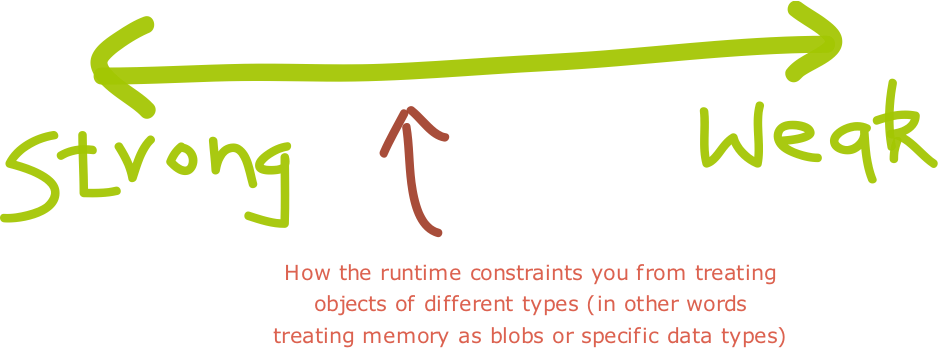
Static/strong and dynamic/weak are both gauges applied to how forceful a programming language is in enforcing a set of pre-specified of rules. Both strong and weak typed languages have their purpose. Software engineers utilize strongly-typed languages to avoid bugs and errors on run time, while also communicating purpose clearly (what type a value is expected to be). On the other hand, software engineers also utilize weakly-typed languages provides more flexibility to engineers to mess with variable type (guided by best practices), allowing them to be more creative in their code construction.


Specifically, static/dynamic typing is concerned about when type information is required (compile or runtime) whereas strong/weak typing is concerned about how strictly types are distinguished (though its definition is still the subject of scholarly debate). As such, try to avoid describing programming languages as either strong or weak and, instead, focus on describing them as static or dynamic. If a language pops up an error at runtime because you failed to specify the type of the variable, it's probably static and if it doesn't, it's probably dynamic.


References
http://blogs.agilefaqs.com/
https://en.wikipedia.org/wiki/Strong_and_weak_typing
http://stackoverflow.com/questions/2351190/static-dynamic-vs-strong-weak


Thursday, March 17, 2016

Promises (ES6)

Thursday, March 17th 2016

What is a promise? 
Simply put, a promise is used in lieu of a value to allow code to be run asynchronously. Promises are important because they address an important issue and without them, websites and apps would take noticeably longer to run. The issue is that every time you make a request to a server, you have to wait for that server to respond, which can sometimes be slow (~1-2s). Meanwhile, there is all this other code to run that's all just waiting for this server response. So, instead, we can create a promise that refers to the value that we receive from the server some point later in the code so all of the other code can run. As a result, promises allow us to run code asynchronously thereby making our websites and apps much faster. Below is a flow chart explaining the process that promises go through.


So we start out with creating a promise (there are multiple modules for promises in es5, but thankfully promises are native to es6). Once we have encapsulated what code we want to run within the promise, we can then run code asynchronously while waiting for that promise to be settled (either fulfilled (success) or rejected (error)). Once it's settled, the promise is returned and the code moves on. (An important note, returning the promise typically refers to the value returned, not repeating another Promise Constructor).

References:
https://developer.mozilla.org/en-US/docs/Web/JavaScript/Reference/Global_Objects/Promise
http://stackoverflow.com/questions/22539815/arent-promises-just-callbacks
http://stackoverflow.com/questions/14220321/how-do-i-return-the-response-from-an-asynchronous-call?lq=1